Welcome to the People & Directory module, the foundation of parish management in Kononia. This guide will walk you through the essential operations of handling member records.
Introduction to Member Records
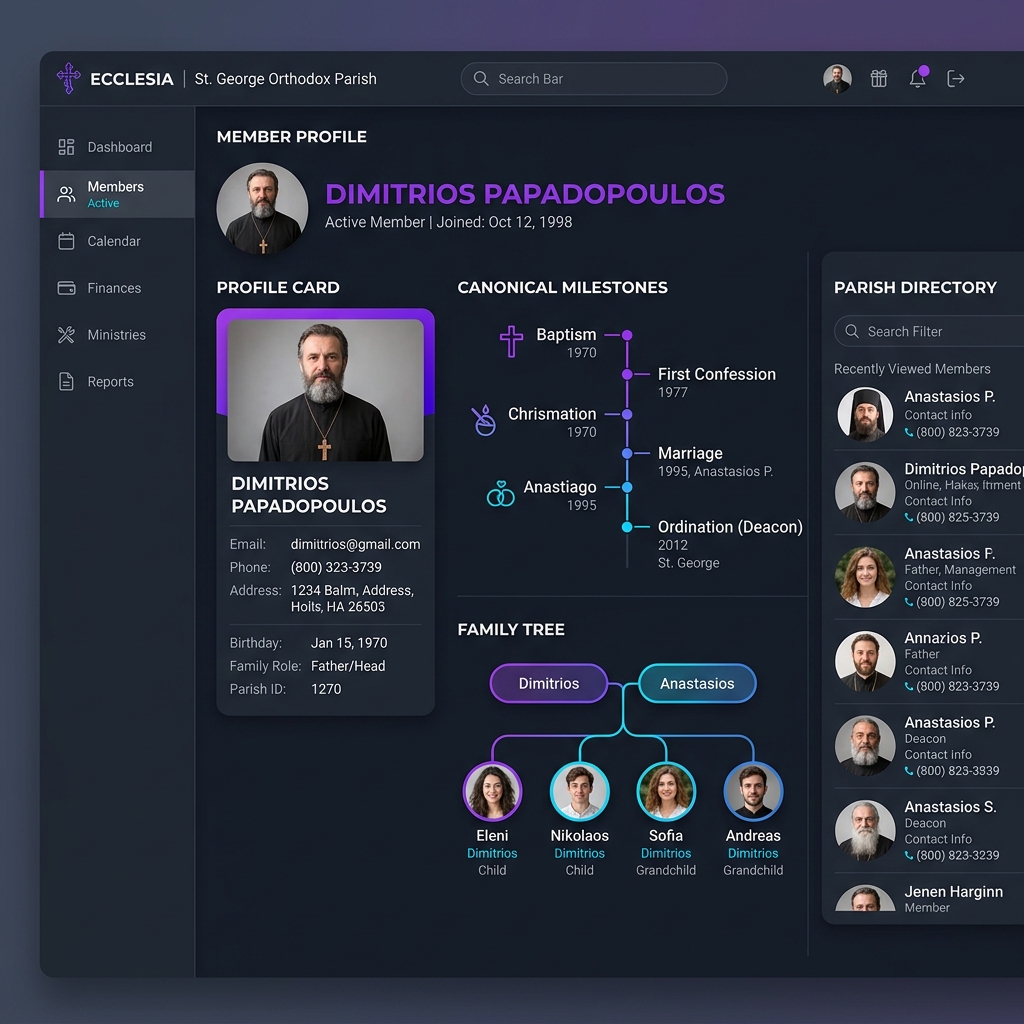
A member profile in Kononia aggregates all relevant demographic, canonical, and engagement details in a single secure registry. This consolidated 360-degree profile prevents the loss of records and replaces fragmented tools.
What is a Consolidated Profile?
Unlike basic spreadsheets, a member profile in Kononia automatically tracks:
- Canonical Milestones: Baptism, marriage, ordination, etc.
- Family Links: Parents, spouse, children, and siblings.
- Service Rosters: Active classes, ministries, or committees.
Adding a New Member
To add a new member, log in to your dashboard and follow these simple steps:
- Navigate to People in the main sidebar.
- Click the Add Member button.
- Fill out the core canonical fields:
- Full Canonical Name
- Date of Birth
- Sacrament milestones
- Confession Father
[!NOTE] Ensure that you fill out the Confession Father field correctly. This helps in automatically generating pastoral engagement queues for specific priests.
Creating Family Relationships
Establishing family connections is crucial for household-based workflows (e.g., annual contribution statements).
Connecting Spouses
When adding a marriage sacrament, the system automatically creates a family link between the husband and wife’s profiles.
Connecting Children
You can add family links manually by viewing a child’s profile and specifying their parents, or vice-versa on the parent’s profile page. This dynamically generates a visual family tree.